
MS Plate Weight Calculator – Easy Way to Find Plate Weight by Shape and Size
MS Plate Weight Calculator helping you know the weight of steel plates in shapes like square, circle, and rectangle. This tool is helpful for engineers, workers, and builders who use mild steel plates, sheets, and flat parts in daily work. By adding the size, shape, and number, you can easily find the total weight in kilograms or tons.
You can use this calculator when cutting MS plates, buying new steel sheets, or planning total steel needed in a project. The tool gives instant and correct results. You can check area, volume, and total weight in one place. It works for all standard shapes like rectangular, square, and circular plates.
What is MS Plate Weight Calculator?
MS Plate Weight Calculator is a simple online tool that helps to calculate plate weight based on its size, thickness, and density. MS means Mild Steel, which is commonly used in construction, machinery, fabrication, and many industries. Knowing the plate weight helps you in ordering material, transport, and cost planning.
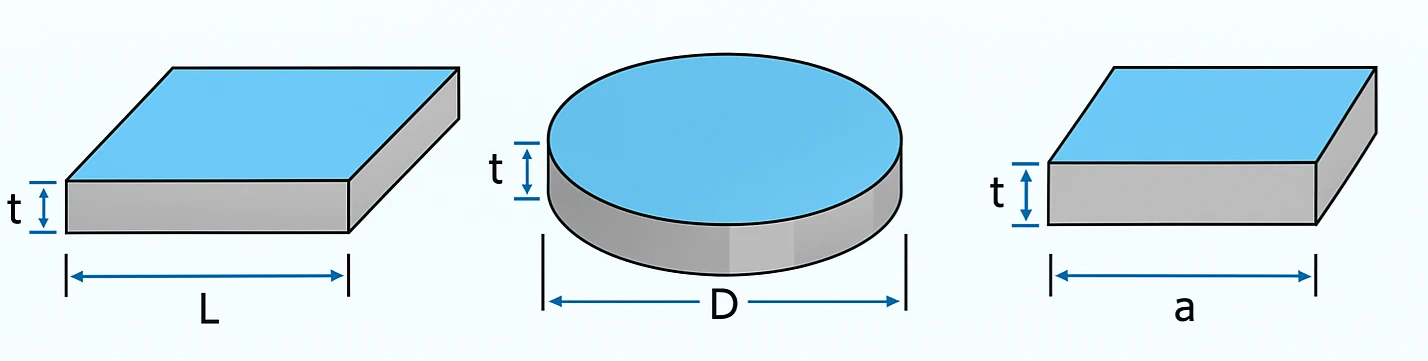
In this calculator, you can select the shape (square, rectangle, circle), add dimensions like length, width, or diameter, choose thickness, and quantity. It will show: Area of the plate, Volume of the plate, Total weight in kg and ton.
Why Do You Need to Calculate MS Plate Weight?
In construction fields, plate weight is very important. It helps you plan everything from cost to loading. Some main reasons are:
- Material cost: Before buying, you can estimate how much steel is needed and total cost.
- Planning and transport: Helps you plan truck load and handling easily.
- Cutting and fitting: Knowing exact plate weight and size gives accuracy in work.
- Project estimation: It is useful for quotation, billing, and wastage control.
Basic Formula to Calculate MS Plate Weight
The basic formula used by the calculator is:
Weight (kg) = Volume (m³) × Density (kg/m³)
Volume is found by multiplying area and thickness:
Volume = Area × Thickness
The standard density of steel is 7850 kg/m³. This value is used for most calculations.
Shape-wise Formula and Use
| Shape | Formula for Area | Formula for Volume | Formula for Weight | Where It Is Used |
|---|---|---|---|---|
| Rectangular Plate | L × W | L × W × t | L × W × t × Density | Used in flooring, base plates, and frames |
| Square Plate | A × A | A² × t | A² × t × Density | Used in cover plates, small components |
| Circular Plate | π × (D/2)² | π × (D/2)² × t | π × (D/2)² × t × Density | Used in flanges, discs, and machine parts |
Steel Types You Can Select in Calculator
The calculator includes many steel types. Each has different density and use. You can also select "Custom text field" if you have special-grade steel.
| Steel Type | Density (kg/m³) | Common Use |
|---|---|---|
| Mild Steel (MS) | 7850 | Used in general construction and fabrication |
| Carbon / Tool Steel | 7850 | Used in tools and machines needing hardness |
| Cold-Drawn Steel | 7830 | Used in precision parts and shafts |
| Hot-Rolled Steel | 7850 | Used in beams and welded structures |
| Alloy Steel | 7850 | Used in heavy-duty and high-strength parts |
| Spring Steel | 7850 | Used in springs and flexible parts |
| Stainless Steel 304 | 8000 | Used in kitchen and chemical plants |
| Stainless Steel 316 | 8000 | Used in marine and medical tools |
| Galvanized Steel | 7850 | Used in outdoor roofing and coated items |
| High Speed Steel (HSS) | 8150 | Used in drills and cutters |
| Custom Steel | User Defined | Used if you have special density material |
"Mild Steel is made by combining iron and carbon, where iron forms about 98% to 99% of the alloy, and carbon content typically ranges from 0.15% to 1.5%." Stainless steel is good for rust protection. Carbon and tool steel are strong and used for heavy jobs. You can pick the right one in dropdown while using the calculator.
How to Use MS Plate Weight Calculator
- Select steel type from dropdown
- Choose shape: rectangle, square, or circle
- Enter dimensions (length, width, or diameter)
- Enter thickness
- Add number of plates
- Result will show area, volume, and total weight
Example Calculation
Example 1: Rectangular Plate
- Length = 2 m
- Width = 1 m
- Thickness = 0.01 m
Volume = 2 × 1 × 0.01 = 0.02 m³
Weight = 0.02 × 7850 = 157 kg
Example 2: Circular Plate
- Diameter = 1 m
- Thickness = 0.02 m
Area = π × (1/2)² = 0.785 m²
Volume = 0.785 × 0.02 = 0.0157 m³
Weight = 0.0157 × 7850 = 123.15 kg
Where You Can Use MS Plates
| Use Area | Description | Shape Used |
|---|---|---|
| Construction | Used in base plates, beams, and flooring | Rectangular / Square |
| Fabrication | Used in brackets, covers, and panels | Rectangular / Square |
| Machine Parts | Used in discs, gears, and flanges | Circular |
| Automotive | Used in mounts, chassis, and brackets | Rectangular / Square |
| Shipbuilding | Used in hull and deck structures | Rectangular |
Advantages of Using This Calculator
- Simple and easy to use
- Instant weight in kg and ton
- Supports all shapes and units
- Helps in cost and material planning
- Accurate and reliable results
Common Mistakes You Should Avoid
- Using wrong units (mm, cm, m)
- Not converting thickness properly
- Leaving quantity blank
- Using wrong density
FAQs – MS Plate Weight Calculator
1. What is density of MS plate?
Density of MS (Mild Steel) is taken as 7850 kg/m³. This value means one cubic meter of mild steel weighs about 7850 kilograms. In the calculator, density is used to convert volume into weight. If you enter size and thickness, the tool first finds volume and then multiplies by density to get weight. For most mild steel sheets and plates, this standard value works well in estimation and planning.
2. Can I use this for stainless steel?
Yes, you can use the same calculator for stainless steel. Just choose stainless steel 304 or 316 from the steel type list. The calculator will use density around 8000 kg/m³ for stainless. 304 is common for food and chemical use, and 316 is common for marine or high corrosion areas. When you select the right type, the final weight becomes more accurate for your material.
3. What units can I use?
You can enter values in m, cm, mm, inch, feet, or yard. The calculator converts them in the background to standard units before doing math. This helps you work with any measuring system you have on site or on the drawing. For best results, keep all inputs in one unit system for a single calculation, and double-check thickness and area units before you proceed.
4. How many shapes are supported?
The calculator supports three common plate shapes: Rectangular, Square, and Circular. Rectangular is for plates where length and width are different. Square is for plates where both sides are equal. Circular is for round plates where you only need diameter. These three cover most fabrication and construction use cases for plates and sheets.
5. Can I add multiple plates?
Yes. Use the Quantity field to enter how many plates you have. The calculator will multiply the single-plate volume by the quantity and then apply the density to show the total weight. This is useful when you are ordering or moving several identical plates and want a single combined weight for billing, transport, or lifting plan.
6. Is this accurate?
For estimation and planning, the results are very close because the tool uses standard formulas and standard density values. In real projects, final weight can change slightly due to exact composition, mill tolerance, cutting loss, or surface coating (like galvanizing or paint). For billing or inspection, you can compare with actual weighbridge data. For day-to-day planning, this calculator is accurate enough.
7. What is the formula for circular plate?
A circular plate uses the area of a circle and then multiplies by thickness and density. The steps are simple: first find the area using Area = π × (D/2)², where D is the diameter. Then get volume using Volume = Area × Thickness. Finally, convert volume to weight using Weight = Volume × Density. When you select “Circular” in the tool and enter diameter and thickness, the calculator does all these steps for you.
8. Why use online calculator?
An online calculator saves time and avoids common mistakes with unit conversion and formulas. You do not need to remember π or convert mm to meters by hand. You also see total weight instantly when you change thickness or quantity. This helps in quick decision making for purchase, cutting plan, transport, and safety checks. It is fast, simple, and reduces manual error.